Jennifer Ferro Dumnps Harry Shearer for TED

Some relationships endure; some end. I’ve just finished celebrating the 20th anniversary of my wedding to Judith Owen. We’re staying together.

On the other hand, Le Show is leaving KCRW Radio. Not of my volition.

On Monday, April 15, I had an Income Tax Day to remember. I was invited to hear a “proposal” from the general manager of KCRW. The proposal was, in fact, a notice of a fait accompli. Le Show was being canceled from the airwaves–something I had suspected might be the nature of the proposal, but the surprise was the timing: “effective immediately”.

Thus does public radio, in one more small way, come to resemble ever more closely commercial radio’s way of doing business In fairness, KCRW gave me a weekly hour for nearly 30 years, and our deal was simple: they got my program for free, and they left me completely alone. That deal is over.

Le Show will continue to air on the many wonderful affiliated radio stations around the country, and on our outlets overseas. It will continue as a podcast, as well. And I’m in the process of seeking an alternative broadcast outlet in Los Angeles.

Harry Shearer dropped by KCRW-FM after a 30-year run  By Lee Margulies LA Times

KCRW gets 'Le Show' off the road as part of new strategy  By Steve Carney LA Times

"Drivers, the poor and the elderly — who wants that audience? Well, gee, I do!" Shearer said while opening his show Sunday

Interview: Harry Shearer on 'Le Show' being taken off the air in Los Angeles (audio)

“I got a message that the general manager wanted to discuss a ‘proposal’ with me,” Shearer said. "I understand broadcast speak to know that that wasn’t, ‘will you marry me?’

Le Show Host Harry Shearer Moves On  LOS ANGELES MAGAZINE

http://harryshearer.com/


Macklemore_(8465188669)

The Real Story Of How Macklemore Got ‘Thrift Shop’ To No. 1

by ZOE CHACE

The No. 1 song in the country right now is "Thrift Shop" by Macklemore and Ryan Lewis, a rap group out of Seattle. Their claim to fame: They got the song to the top of the chart by themselves, without being signed by a major label. They've bragged about this success in a video spoof and on Twitter.  But the story they've been telling — the story that's been widely reported — is not entirely true.  The truth is that Macklemore and Ryan Lewis hired a company to help them get their music into stores. That company, Alternative Distribution Alliance, is an arm of Warner Music Group, one of the most major of the major labels.

Still, the rise of "Thrift Shop" is something new. It's an indication of a power shift away from the major labels to the artist themselves. Clearly, Macklemore and Ryan Lewis accomplished a lot on their own.    Listen to the NPR story ….
 

image of Flycut icon

Flycut – App of the week


Flycut is an example of great software that does one thing well and solves a problem that almost everyone has.  It is a clipboard utility for the Mac that allows for practically limitless number of ‘copy’ items to remain available for paste.  The standard Mac clipboard keeps just one copy item – each subsequent copy replaces it so it’s copy, paste, copy, paste, copy, paste often switching between windows or tabs of a browser each time.  Flycut is a small “resident” program that allows for multiple copy commands to be stored for later pastes in any order.


tmaction

How To Delete Files or Folders from a Time Machine Backup – Update

Feature no longer available.

Apple has removed this capability.  For the reasons in the original post below it can at times be necessary to remove files not just from the current active drive but from all backups as well.  Now that this capability is no longer available on Time Machine,

In modern versions of macOS (Big Sur and later), Time Machine drives are formatted as APFS, which uses “snapshots.” By design, these snapshots are read-only and immutable.

This means you can no longer delete individual files (like a specific large video or a sensitive document) from a Time Machine backup without deleting the entire backup for that specific date.

Recommended Solution

Remove the Time Machine  drive with sensitive information and lock it away.

Format a new Time Machine drive and start fresh using method 3 below.

Alternative

Exclude a folder from ™ backups and use a non Time Machine backup method that allows for file deletion for just that one folder.

Here are the only working methods to achieve your goal, ranging from “Specific” to “Nuclear.”

Method 1: Delete the Specific Backup “Instance” (Terminal)

If you know which specific backup dates contain the file you want to remove, you can delete those entire backup instances. This keeps your other backup dates intact.

  1. Open Terminal (Applications > Utilities > Terminal).

  2. Type the following command to list all your backups: tmutil listbackups

  3. Find the specific date/timestamp of the backup you want to remove.

  4. Run this command to delete that specific backup: sudo tmutil delete -d /Volumes/[YourBackupDriveName] -t [YYYY-MM-DD-HHMMSS] (Replace [YourBackupDriveName] with your drive’s name and the timestamp with the one you found in step 2).

Method 2: The “Nuclear” Option (Start Fresh)

If you need to ensure a sensitive file is 100% gone from all history, or if the file exists across hundreds of snapshots, the only practical way is to wipe the drive and start over.

  1. Open Disk Utility.

  2. Select your Time Machine drive.

  3. Click Erase (Format as APFS).

  4. Set it up as a new Time Machine drive.

    • Note: This deletes your entire backup history.

Method 3: Prevent it from happening again (Exclusion)

To ensure this specific file or folder is never backed up again in the future:

  1. Open System Settings -> General -> Time Machine.

  2. Click Options.

  3. Click the + button and select the folder or file you want to permanently exclude.

Why was this removed?

In older versions of macOS (HFS+ format), Time Machine used “hard links,” which allowed users to delete a file’s link without breaking the file system. Modern APFS backups are block-level snapshots. If Apple allowed you to delete a single file from a snapshot, it would break the cryptographic integrity of that snapshot (and potentially the chain of backups following it), risking total data corruption.

Why (original post)

Mac OSX Time Machine software is my favorite method for backing up data.  If you use a Mac there is no excuse for not using this built in utility that keeps a backup of your data on an external drive, another Mac, a Apple Time Capsule or, with some tweaks, a network storage server.

Like any back-up software from the dawn of back-up software, deleting a file on your computer will not delete the file from your Time Machine back-up.  A good  back-up solution allows you to recover from an entire disk drive failure as well as  recovering one file or even one email that you accidently deleted.

There are times when you really do want to not only delete a file or folder or email but to purge it from your back-ups.  For example, you work on a project that involves material covered under a confidentiality agreement that requires all material to be returned or destroyed at the end of the project.  Just deleting the files and folders on your computer will still leave copies on your back-up drive leaving you in breach of the agreement and potentially liable for damages if the drive is stolen and the information disclosed.

 

osx Archiver icon

A Fix for Mac OSX Archiver Hanging Up – Mountain Lion 10.8.2

The Mac Archiver is Apple’s built in archive utility that handles  ZIP archives.  Recently, when I tried to decompress a downloaded ZIP file the Mac Archiver started up and then became         unresponsive.  I found the following solution corrects the problem –

{C}

1) Using Finder, open the Applications folder then the Utilities folder inside the Applications folder.  Run Disk Utility – In the left pane select your system disk – on the right you will see the First Aid tab.  Select REPAIR DISK PERMISSIONS near the bottom. Wait until it finishes.

2) Using Finder click on the GO dropdown menu and select Go to Folder.  Enter ~/Library  – that’s a squiggle forward slash and the word Library (uppercase L).

3) Open the Preferences folder and move the following files to the trash-
com.apple.archiveutility.plist
com.apple.archiveutility.lockfile (may or may not be there)

4) Restart your computer and test it.  Be sure to rstart before running Archiver again.

Back to School – Notepad and Audio Recorder for Mac

 Free or inexpensive software can make taking notes during class lectures more effective.  They accomplish this by recording the lecture as you take notes.  Later, by placing your cursor anywhere in the document, you can play the audio recorded at the time that note was taken.   

These programs make it possible to add notes that were missed during a fast moving lecture and remove the pressure of constant note taking when you just want to focus on what's being said.  When reviewing your lecture notes, if something isn't clear, you can play the audio from that point in the lecture.

 Microsoft Office Mac Home & Student  $99 3 license Family Pack Amazon
Audionote for Mac – $2.99  –  5.99 on Mac App Store
Audionote for Windows $19.95 by Luminant
Pear Note – all in one Mac Audio & Notes program $39.99 Mac App Store

Word 2007 for Windows has the recording feature although it must be added to the Quick Access Menu.  Word 2010 for Windows does not have the recording feature.

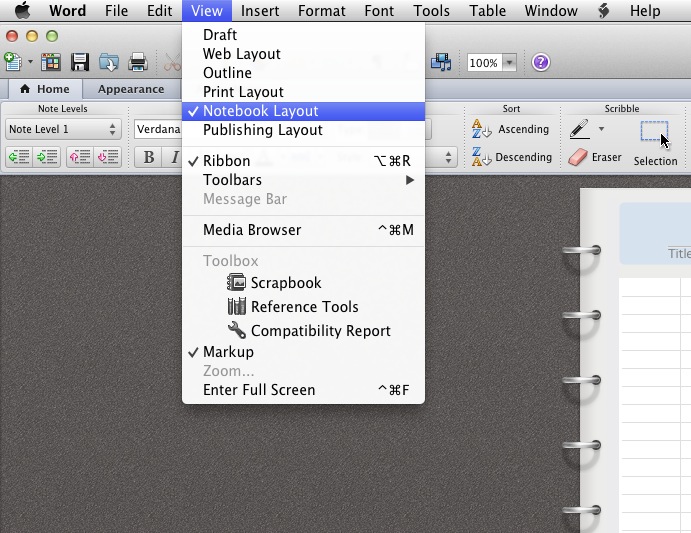
If you have Microsoft Office for Mac you will find this feature by opening a new or existing document and selecting the NOTEBOOK view.


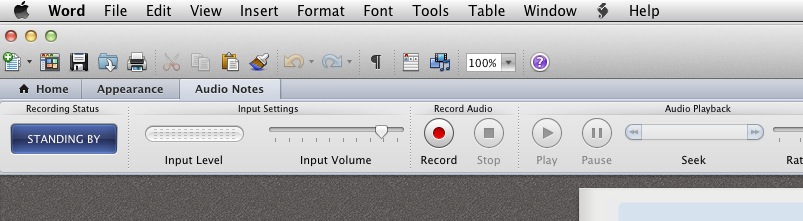
then select the AUDIO tab to set up recording


Know of others? – leave a comment