Category Archives: Uncategorized
Secret IRS Files Reveal How Much the Ultrawealthy Gained by Shaping Trump’s “Big, Beautiful Tax Cut”

Billionaire business owners deployed lobbyists to make sure Trump’s 2017 tax bill was tailored to their benefit. Confidential IRS records show the windfall that followed.
by Justin Elliott and Robert Faturechi Aug. 11, 5 a.m. EDT PRO PUBLICA
How to dismiss multiples of the “Disk Not Ejected Properly” notification in macOS
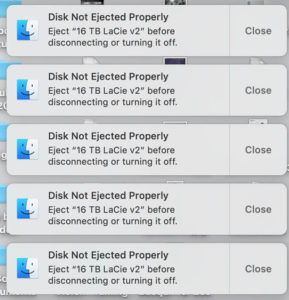
Using terminal enter the command.:
pkill NotificationCenter
Update – AB 1139 Defeated
Thanks to everyone who contacted their representatives to help defeat the bill. One of the reasons for the bill authored by Lorena Gonzalez (D-San Diego) was to ensure that non-solar customers did not end up paying more at the expense of solar customers. This is a worthy goal however the bill as written would have penalized solar customers, effectively stopped new residential solar installations and would have a negative impact on climate change. Most of the bills provisions would have benefited the big power companies with no guarantees of consumer benefits.
Stop California utilities from blocking the sun.
UPDATE The bill was defeated however SCE continues to lobby California legislators to quash residential solar.

Flashing TM-AC1900 to RT-AC68U/P
UPDATE
The firmware for the AC68U/P is no longer supported thus is no longer a recommended option. If you flashed your TM AC1900 to stock RT-AC68U/P then replacing the firmware will provide enhanced security.
AI Suggestions
Top Firmware Alternatives for RT-AC68U/P:
- Asuswrt-Merlin: This is highly recommended for retaining the familiar ASUS GUI while fixing bugs, enhancing performance, and adding user scripts. It keeps the Asuswrt interface but makes it more robust.
- FreshTomato: A fork of the original Tomato, often preferred for its stability, advanced, and intuitive GUI. It is frequently updated, making it excellent for security patches on older hardware.
- DD-WRT: A more advanced, open-source firmware that provides extensive networking features, such as advanced VLAN configuration and VPN support.
- OpenWrt: A highly flexible, modular, open-source Linux-based system, though it may have limited support for the specific hardware revisions of the AC68U compared to others.
If you have the original TM AC1900 firmware it is possible but probably not worth the effort to install supported firmware. A guide can be found here – Flashing Merlin to TM-AC1900 or AC68U (Updated for 384 builds). Posted on January 1, 2018 By Luis Rodriguez
Original Post
COVID19 and Stay-at-Home orders make performing this moderately difficult and time consuming procedure make sense.
Continue reading
Quarantine Activity 3 – Organize and Secure Your Passwords
Updated
Since the original post the need to properly manage passwords has become even more critical. In the last few years data breaches have exposed the emails, passwords and other personal information of hundreds of millions of individuals. Using the same password on multiple sites is a recipe for disaster. Password requirements for most sites require a minimum of 12 or more characters including uppercase, lowercase, numbers and symbols making them virtually impossible to memorize and the use of a password manager a necessity.
Combined with 2FA – 2 factor authentication, a password manager can prevent your bank account from being emptied or your identity stolen.
Ny current recommendation is Bitwarden, a feature rich password manager that works on all popular devices and operating systems.

Advantages of Bitwarden:
1. Open Source Architecture
Unlike most of its competitors (LastPass, 1Password, Dashlane), Bitwarden is open-source software.
Transparency: Its source code is publicly available for anyone to inspect. This means security researchers constantly audit the code for vulnerabilities, making it difficult for backdoors or security flaws to go unnoticed.
Trust: You don’t have to blindly trust the company’s word that they are secure; the community validates it.
2. Industry-Leading Free Plan
Most password managers restrict their free plans to a single device type (e.g., only on your phone or only on your computer). Bitwarden does not.
Unlimited Devices: You can use it on your phone, laptop, tablet, and desktop simultaneously for free.
Unlimited Passwords: There is no cap on how many login credentials you can store.
Core Features Included: You get unlimited syncing, a secure password generator, and basic two-factor authentication (2FA) without paying a cent.
3. Strong Security Fundamentals
Bitwarden employs a Zero-Knowledge encryption model.
Client-Side Encryption: Your data is encrypted on your device before it is sent to Bitwarden’s cloud servers. Bitwarden staff cannot see your passwords even if they wanted to.
Compliance: It is compliant with major privacy and security standards, including GDPR, CCPA, and HIPAA.
Third-Party Audits: The software undergoes regular security assessments by reputable third-party security firms (like Cure53) to validate its safety.
4. Advanced “Power User” Features
For technical users or those who prefer total control, Bitwarden offers features that competitors often lack:
Self-Hosting: You can host your own Bitwarden server on your personal hardware (e.g., Raspberry Pi, NAS, or private cloud). This gives you complete sovereignty over your data, removing reliance on Bitwarden’s cloud entirely.
Bitwarden Send: A feature that allows you to securely share encrypted text or files (up to 500MB in the paid plan) via a link that can be set to self-destruct or expire.
Even though the quarantine is over it’s worth the time and effort to get your passwords in shape.
POST UPDATE Last Pass experienced a serious security breach resulting in users passwords potentially being exposed. I no longer recommend using LastPass.
 Who has time to undo years of poor password hygiene? You do now.
Cleaning up and securing your passwords is a great COVID19 quarantine activity.
This activity involves:
Signing up for LastPass- Collecting all your old password notes and account emails
- Deleting any accounts that do not bring you joy
- Setting secure passwords for all remaining accounts
Quarantine Activity # 10 -Digitize your Photos and Slides
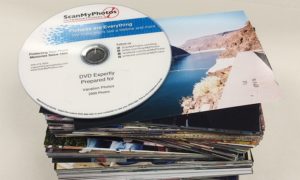
Gather all your decades-past photo albums and shoeboxes of family snapshots and send them out to be scanned.
- Easier to Access and Share
- Protection from loss due to fire
- Covid19 friendly
I have used ScanMyPhotos.com several times for both prints and slides. They are not the least expensive however the quality is goo and they are local – in Irvine. They run specials on a regular basis – sign up for their newsletter and order when there is a 33-40% off offer. I generally get the highest resolution they offer with no other options.

HOWTO: Re-Index the Spotlight Index on a Mac
The file search tool Spotlight on Macs is a fast flexible way to find files, except when it isn’t. Occasionally Spotlight does not find files I know are on my Mac and the index needs to be repaired.
To force Spotlight to delete an old index and create a new one:
- Click the Privacy tab.
- Drag the folder or disk that you want to index again to the list of locations that Spotlight is prevented from searching. Or click the Add (+) button and select the folder or disk to add.
- Choose Apple menu () > System Preferences, then click Spotlight.
- To add an item to the Privacy tab, you must have ownership permissions for that item. To learn about permissions, choose Help from the Finder menu bar, then search for “permissions.”
- From the same list of locations, select the folder or disk that you just added. Then click the Remove (–) button to remove it from the list.
- Quit System Preferences. Spotlight will reindex the contents of the folder or disk. This can take a long time.